Westclox
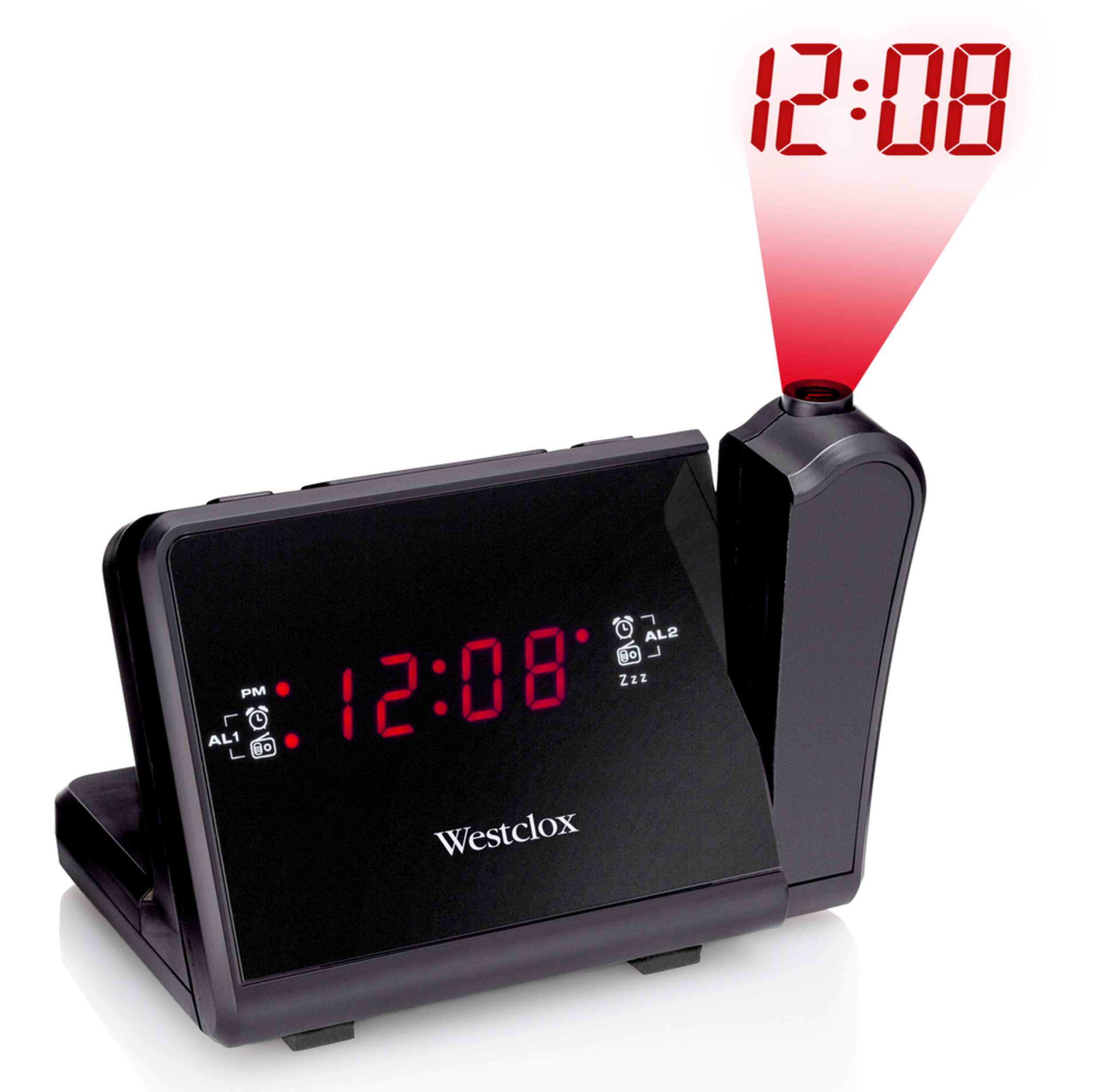
Westclox AM/FM Projection Clock Radio
#044-1196-4
$29.99
Unfortunately, this product is discontinued in your selected store and nearby stores.
You may be interested in these similar products shown below.Similar Items




Quebec residents: For information on maintenance and repair click here.

Product Details
Westclox AM/FM Projection Clock Radio projects time on the walls or ceiling
Wake up to the radio or a buzzer alarm
Dual alarm and snooze functions included
Battery back-up available in case of power failure
Warranty
- This product carries a 1 year exchange warranty redeemable at any Canadian Tire store.
Online Ordering
- Pick Up is free at most stores (some stores require a minimum order value before tax)
- Shipping fee is based on size and weight of products and distance from address to store
- Same-Day Delivery costs $9.99 per order
- Online Ordering Information
Returns
- Most products can be returned or exchanged at any Canadian Tire store within 90 days of purchase
- Some products are non-refundable and non-exchangeable
- The return policy outlined above may not apply to the product you are currently viewing. For complete details and eligibility, please refer to our Return Policy for exceptions.
Compare Similar Products
Only Show Differences | Currently Viewing | |||||
| Ratings | ||||||
| Accessories List | No Accessories Included | No Accessories Included | No Accessories Included | No Accessories Included | ||
| Advanced Features | Digital Tuner, Dimmable, USB Port | Alarm, Large Display | Alarm, Large Display | Alarm, Large Display | ||
| Assembled Height (ft) | 0.70 ft | 0.32 ft | 0.21 ft | 0.37 ft |


Shop Related Products
- Weekly Deals
- Customers Also Viewed
- Top Trending Products
- More From This Brand

Review Highlights
Reviews
Filter Reviews
- ceiling projection
- clarity
- radio
- satisfaction
- alarm
- impractical
- in-store
- instructions
Rating
Locale
1 to 5 of 7 Reviews
1 – 5 of 7 Reviews
Most Recent
5 out of 5 stars.
Manual required
8 years ago
I actually love the concept of this clock and the compactness, but I haven't been able to find the manual to tell me how to set the darn thing!!!
No, I do not recommend this product.
Helpful?
1 out of 5 stars.
Ne donne pas la même heure sur les 2 cadrans
8 years ago
Différence entre les 2 cadrans.
Prend 5 minutes par 4/5 jours
Translate with GoogleNo, I do not recommend this product.
Helpful?
5 out of 5 stars.
Great product
9 years ago
This product is what it promises to be; a projection clock. Good quality, clear projection, and radio as a bonus.
Yes, I recommend this product.
Helpful?
5 out of 5 stars.
great projection
10 years ago
Happy with the projection on the ceiling. You do have to set the time twice but that's a one time thing.
Image on the ceiling is clear and good visible (thanks to the adjustable wheel on the projector part)
Happy with the product!
Yes, I recommend this product.
Helpful?
1 out of 5 stars.
Terrible design - useless
10 years ago
Purchased as a projection clock. Did not care about radio or alarm
The clock in the store is model DLCR580P - not the same as illustrated even tho' CTC prod # matches.
Projector time is set separately from base unit - buttons too close together - makes difficult to set. Projected image too small to be useful. Projector does not have sufficient clearance - hits tabletop when being swiveled so base unit gets tipped around. Projector will not stay in position because base unit tries to get back to flat on table.
Device next to uselss - to be returned to store.
No, I do not recommend this product.
Helpful?
1 – 5 of 7 Reviews
Questions
Start typing your question and we'll check if it was already asked and answered.
1 - 10 of 11 Questions
Most helpful answers
Q: How do you shut off the alarm permanently ? it comes on every day at the same time and I shut it off but want to permanently shut it off. I don't need the alarm
a year ago2 Answers
A: Hi Michael. Good morning and thank you for your interest in our Westclox AM/FM Projection Clock Radio. MODEL #80208CN, Michael, If you would like to shut the alarm off on your clock permanently, just Press either the ALARM 1 or ALARM 2 button (Whichever one is in use) repeatedly as needed to select BUZZER, RADIO or OFF. Choose the OFF selection and make sure that the alarm on indicator light is no longer lit. Michael, if it is not lit, then the alarm on your clock has been successfully deactivated. Michael, thank you again for contacting us here on the Bazaarvoice portal. We really do appreciated your business. Best regards!
a year agoHelpful?
Q: How do I set the time on this clock. I have lost the instructions. Product #44-1196-4
12 years ago2 Answers
A: I had the same issue in that I kept HOLDING the time set button - and, you need to release it to set the time. Here are the steps: 1. Press the time set button until the time is flashing - then, release. 2. Press the "hour" and "minute" buttons to set the time. 3. Press the time set button to set the time.
11 years agoHelpful?
Q: how do i turn off the alarm My manual was thrown out. How do I shut off the alarm without snoozing it every 20 minutes?
12 years ago2 Answers
A: Reminder that the digital display time and the tower time are set independently.
11 years agoHelpful?
Q: Is this AC or battery powered?
13 years ago2 Answers
A: AC powered through old style transformer block - may obstruct balance of outlet. Relatively short cord.
10 years agoHelpful?
Q: I have this alarm clock, but I cant seem to get the projection colons to stop blinking. I don't know why it is doing that. Normally clocks colons only blink when you are setting the time. Anyone know how I can get it to stop?
4 years ago1 Answer
A: Hi, the colons on this clock do not stop blinking.
4 years agoHelpful?
Q: How do I set the time on 80208CN alarm clock - I got it to set on the ceiling time but not on the main clock. HELP
7 years ago1 Answer
A: TO SET OR RESET THE ALARM TIME 1. Press and hold the ALARM SET/OFF button (5). 2. While holding the ALARM SET/OFF button (5) press the HOUR SET button (9) and MINUTE SET button (10) to advance the time until the desired alarm time is shown on the display. For a copy of the manual, please call 1-800-387-8803.
7 years agoHelpful?
Q: I need help setting the alarm I lost the manual. Thank you very much
7 years ago1 Answer
A: In order to obtain the information you require, we encourage you to communicate with us by calling 1-800-387-8803.
7 years agoHelpful?
Q: If I place the clock on a table beside the bed,does the projection on the ceiling appear upsidedown?
9 years ago1 Answer
A: No the projection will not display time upside down.
9 years agoHelpful?
Q: How to set time and radio station on Digitdl lab clock radio model DLCR580P Lost directions
10 years ago1 Answer
A: Here are the steps: 1. Press the time set button until the time is flashing - then, release. 2. Press the "hour" and "minute" buttons to set the time. 3. Press the time set button to set the time. Please call our Customer Relations Department (1-800-387-8803) to obtain a replacement manual.
10 years agoHelpful?
Q: how do i set the snooze Time on this clock
11 years ago1 Answer
A: The snooze is not adjustable. As indicated on the side of the box and in the manual the snooze will go off every 9 minutes until the alarm is turned off.
11 years agoHelpful?
1 - 10 of 11 Questions