Grand solde de pneus pour pour camions. Jusqu'à 25 % de rabais sur certains pneus pour camions et VUS de grandes marques.
Magasinez🎒✏️📒Le Retour en classe commence ici. Faites le plein de fournitures scolaires, d'articles technologiques, de sacs à dos et plus.📒✏️🎒
MagasinezObtenez 2 $ de prime en Argent CTMD* sur 25L et plus d'essence les mardis chez Essence+ ou Petro-Canada. *Des conditions s’appliquent.
En savoir plusLes membres du programme Récompenses Triangle obtiennent une expédition locale GRATUITE sur toutes les commandes de livraison à domicile admissibles d’une valeur de plus de 99 $ !


Offres
Nouveu et en vedette
Départements
- Automobile
- Abris d'auto
- Accessoires d'extérieur
- Accessoires d'habillement extérieur
- Bavettes garde-boue et pare-éclaboussures
- Décalcomanies et graphiques
- Drapeaux pour l’auto
- Housses d'auto
- Pare-soleils et déflecteurs
- Rétroviseurs pour angle mort
- Supports de cadre de plaque d'immatriculation
- Supports de toit, porte-bagages et gestion de cargaison
- Treuils
- Accessoires pour camionnettes
- Accessoires extérieurs pour camions
- Attelages, chasse-neiges et accessoires
- Barre à DEL
- Bavettes garde-boue et pare-éclaboussures
- Couvertures de caisse
- Filtres à air haute performance
- Gestion de cargaison
- Housses et coussins de siège
- Jeu de lumières et feux utilitaires
- Marchepieds
- Remorques et accessoires de remorquage
- Ventes de Remorques et accessoires de remorquage
- Liquidation de Remorques et accessoires de remorquage
- Accessoires de remorquage
- Articles de sécurité pour le remorquage
- Attelages de remorque
- Attelages de remorques
- Boules d'attelage et supports
- Câbles, connecteurs et adaptateurs de remorque
- Crics de remorquage
- Feux de remorque
- Miroirs de remorquage
- Pneus, jantes et chambres à air de remorque
- Remorques de VTT, VUTT et commerciales
- Treuils de remorquage
- Supports et accessoires
- Systèmes d'échappement
- Tapis d'auto
- Accessoires pour l'habitacle
- Accessoires d'habillement intérieur
- Assainisseurs d’air pour auto
- Chaîne porte-clés
- Chargeurs d'auto 12 V et accessoires enfichables
- Housses de volants
- Housses et coussins de siège
- Pare-soleil et visières pour vitres d'auto
- Pellicule teintée pour vitre d'auto
- Rangement pour intérieurs de voitures
- Réchauffeurs d'auto
- Rétroviseurs intérieurs d'auto
- Sécurité et sûreté automobile
- Additifs pour liquides lave-glace
- Antivols de voiture et boîtiers Faraday
- Articles de sécurité d'auto pour animaux
- Balais à neige et grattoirs
- Balises d'entrée
- Câbles d'appoint
- Caméras Et Appareils Photo
- Chaînes pour pneus
- Cordons d'alimentation pour chauffe-moteur
- Crics et crics rouleurs
- Plaques d'adhérence
- Rétroviseurs pour angle mort
- Sièges d'auto
- Trousses de sécurité et accessoires
- Sièges d'auto
- Tapis d'auto
- Audio et électroniques
- Accessoires pour téléphones cellulaires
- Ventes de Accessoires pour téléphones cellulaires
- Liquidation de Accessoires pour téléphones cellulaires
- Amplificateurs de signal cellulaire
- Appareils audio pour l'auto
- Accessoires d'installation d'appareils audio pour l'auto
- Amplificateurs pour l'auto
- Émetteurs FM
- Haut-parleur d'extrêmes graves pour auto
- Haut-parleurs pour l'auto
- Radios BP et accessoires
- Récepteurs de radio satellite et de radio
- Caméras Et Appareils Photo
- Chargeurs d'auto 12 V et accessoires enfichables
- GPS d'auto
- Porte-clés et démarreurs automobiles
- Accessoires pour téléphones cellulaires
- Chargeurs et réparation de batteries
- Batteries automobiles et spécialisées
- Batteries à bac hermétique
- Batteries pour articles de jardinage
- Batteries pour autos et camions
- Batteries pour fauteuils roulants et pour appareils de mobil
- Batteries pour véhicules commerciaux lourds
- Batteries pour véhicules de sports motorisés
- Batteries pour véhicules nautiques
- Batteries pour voiturettes de golf
- Batteries pour VR
- Batteries solaires et à charge poussée
- Câbles d'appoint
- Chargeurs de batteries
- Chargeurs de VE
- Chargeurs et démarreurs de batterie portatifs
- Cosses de batterie
- Ondulateurs
- Sangle de transport de batterie
- Vérificateurs de batterie et outils
- Batteries automobiles et spécialisées
- Éclairage automobile
- Huiles, fluides, additifs et produits chimiques
- Ventes de Huiles, fluides, additifs et produits chimiques
- Liquidation de Huiles, fluides, additifs et produits chimiques
- Additifs et huiles à moteur
- Additifs et nettoyants pour système d'alimentation
- Additifs pour liquides lave-glace
- Antifuites
- Antigels et additifs de système de refroidissement
- Freins et servodirection
- Frigorigènes et additifs pour système de climatisation
- Graisse, huiles pour engrenages et lubrifiants
- Liquides d'échappement diesel
- Liquides et additifs de transmission
- Outils et accessoires de vidange d'huile
- Outils d'auto
- Ensembles d'outils électriques
- Graisseurs et outils de lubrification
- Lampes portatives
- Manuels de réparation
- Matériaux de réparation pour pneus
- Outils d'entretien général
- Outils de diagnostic et de testage
- Outils de réparation pour carrosserie
- Outils et accessoires de vidange d'huile
- Outils pour la direction, suspension et géométrie
- Outils pour la transmission
- Outils pour le système de chauffage, climatisation et refroi
- Outils pour les freins
- Outils pour pneus et jantes
- Outils pour système d'alimentation
- Polisseuses
- Rangement et équipement de garage et d'atelier automobile
- Ventes de Rangement et équipement de garage et d'atelier automobile
- Liquidation de Rangement et équipement de garage et d'atelier automobile
- Bidons à essence et accessoires
- Crics
- Pompes de transfert de fluides et extracteurs
- Presses d'atelier et équipement de levage
- Rangement des outils et organisation de l'atelier
- Sommiers, chariots et tabourets
- Pièces d'auto
- Alimentation de carburant
- Additifs et nettoyants pour système d'alimentation
- Carburant huile capteurs et manocontacteurs pression
- Filtres à carburant
- Joints de moteur
- Outils pour système d'alimentation
- Pièces pour systèmes d'injection de carburant
- Pompes à essence et pièces
- Réservoirs à essence et pièces
- Alternateurs et démarreurs
- Balais d'essuie-glace et ses pièces
- Conduite et alignement
- D'émissions et d'échappement
- Drivetrain et transmission
- Filtres et soupapes RGC
- Freins
- Canalisations, flexibles et câbles de freins
- Étriers de frein et accessoires
- Freins et servodirection
- Moyeux et roulement de roues
- Nécessaires de freins
- Outils pour les freins
- Plaquettes de frein
- Quincaillerie et avertisseurs de freins
- Rotors de frein
- Roue et maîtres-cylindres de frein
- Sabots et tambours de frein
- Moteur et allumage
- Bobines, résistances et modules de commande d'allumage
- Bougies
- Bougies de préchauffage et composants
- Capteurs et commutateurs du moteur et du système d'allumage
- Courroies d'entraînement, tendeurs et amortisseurs de vibrat
- Distributeurs, chapeaux et rotors d'allumage
- Ensembles de câbles d'allumage
- Ensembles de courroies de distribution
- Joints de moteur
- Lecteurs de code, outils d'analyse et de test
- Manomètres et raccords
- Moteur et transmission
- Pièces pour l'alimentation de l'huile
- Tubulures d'admission
- Pièces de suspension
- Pièces performantes
- Pièces pour carrosserie
- Pièces pour l'alimentation de l'huile
- Système de chauffage, climatisation et refroidissement
- Ventes de Système de chauffage, climatisation et refroidissement
- Liquidation de Système de chauffage, climatisation et refroidissement
- Antigels et additifs de système de refroidissement
- Capteurs et commutateurs de température du liquide de refroidissement du moteur
- Chauffe-moteurs
- Filtres à air d'habitacle
- Frigorigènes et additifs pour système de climatisation
- Outils pour le système de chauffage, climatisation et refroi
- Pièces du refroidissement du moteur
- Pièces du système de chauffage et de climatisation
- Systèmes électriques et câblage
- Alimentation de carburant
- Pièces et accessoires de VR
- Accessoires d'eau douce pour VR
- Accessoires électriques pour VR
- Accessoires extérieurs pour VR
- Éclairage pour VR
- Entretien des VR
- Intérieur de VR
- Niveaux et stabilisation de VR
- Plomberie et système sanitaire de VR
- Pièces et accessoires pour VTT, motos et motoneiges
- Ventes de Pièces et accessoires pour VTT, motos et motoneiges
- Liquidation de Pièces et accessoires pour VTT, motos et motoneiges
- Pièces et accessoires de motos
- Pièces et accessoires de VTT et de VUTT
- Ventes de Pièces et accessoires de VTT et de VUTT
- Liquidation de Pièces et accessoires de VTT et de VUTT
- Pièces et accessoires pour motoneiges
- Accessoires généraux
- Allumage et démarrage
- Batteries pour motoneiges
- Chariots de motoneige
- Conduites, filtres, tuyaux à carburant et plys pour motoneiges
- Direction et suspension
- Électronique
- Housses de motoneige
- Huile pour motoneiges
- Matériel de motoneige
- Moteur et transmission
- Parebrises et parechocs de motoneiges
- Skis et carbures
- Traineaux
- Rampes de chargement
- Remorques et accessoires de remorquage
- Ventes de Remorques et accessoires de remorquage
- Liquidation de Remorques et accessoires de remorquage
- Accessoires de remorquage
- Articles de sécurité pour le remorquage
- Attelages de remorque
- Attelages de remorques
- Boules d'attelage et supports
- Câbles, connecteurs et adaptateurs de remorque
- Crics de remorquage
- Feux de remorque
- Miroirs de remorquage
- Pneus, jantes et chambres à air de remorque
- Remorques de VTT, VUTT et commerciales
- Treuils de remorquage
- Pneus et jantes
- Produits d'entretien et de nettoyage automobile
- Ventes de Produits d'entretien et de nettoyage automobile
- Liquidation de Produits d'entretien et de nettoyage automobile
- Aspirateurs pour l'auto
- Cire et esthétique
- Détachant à goudron et moustiques
- Enlève-égratignures
- Nettoyants et dégraissants
- Nettoyants pour pneus, roues et jantes
- Nettoyants pour verre
- Nettoyeurs haute pression, pièces et accessoires
- Ventes de Nettoyeurs haute pression, pièces et accessoires
- Liquidation de Nettoyeurs haute pression, pièces et accessoires
- Outils de nettoyage
- Restoration des phares
- Soins des tapis et des tissus
- Soins du cuir
- Trousses de nettoyage automobile
- Remorques et accessoires de remorquage
- Ventes de Remorques et accessoires de remorquage
- Liquidation de Remorques et accessoires de remorquage
- Accessoires de remorquage
- Articles de sécurité pour le remorquage
- Attelages de remorque
- Attelages de remorques
- Boules d'attelage et supports
- Câbles, connecteurs et adaptateurs de remorque
- Crics de remorquage
- Feux de remorque
- Miroirs de remorquage
- Pneus, jantes et chambres à air de remorque
- Remorques de VTT, VUTT et commerciales
- Treuils de remorquage
- Réparation, peinture et accessoires pour carrosserie
- Ventes de Réparation, peinture et accessoires pour carrosserie
- Liquidation de Réparation, peinture et accessoires pour carrosserie
- Sécurité et sûreté automobile
- Additifs pour liquides lave-glace
- Antivols de voiture et boîtiers Faraday
- Articles de sécurité d'auto pour animaux
- Balais à neige et grattoirs
- Balises d'entrée
- Câbles d'appoint
- Caméras Et Appareils Photo
- Chaînes pour pneus
- Cordons d'alimentation pour chauffe-moteur
- Crics et crics rouleurs
- Plaques d'adhérence
- Rétroviseurs pour angle mort
- Sièges d'auto
- Trousses de sécurité et accessoires
- Maison
- Appareils de sécurité résidentielle
- Cadenas et Moraillons
- Caméras de sécurité
- Coffres-forts, coffres de sécurité et caisses
- Détecteurs de fumée
- Détecteurs de monoxyde de carbone
- Éclairage de zone et par projection
- Extincteurs
- Lampes de poche, lanternes et lampes frontales
- Sécurité à domicile intelligente
- Trousses de premiers soins
- Articles de rangement
- Articles pour la cuisine et solutions de rangement
- Ventes de Articles pour la cuisine et solutions de rangement
- Liquidation de Articles pour la cuisine et solutions de rangement
- Bacs
- Crochets
- Meubles de rangement
- Paniers
- Rangement de jouets
- Rangement et organisation de la garde-robe
- Rangement et organisation de salle de bain
- Rangement et organisation pour buanderie
- Sacs de rangement sous vide
- Sacs et chariots de magasinage
- Solutions de rangement et d'organisation de garage
- Ventes de Solutions de rangement et d'organisation de garage
- Liquidation de Solutions de rangement et d'organisation de garage
- Accessoires pour coffres et armoires à outils
- Armoires de rangement pour garage
- Ceintures et tabliers à outils
- Chariots utilitaires et à outils
- Contenants de rangement en plastique et sacs
- Établis et postes de travail
- Lampes portatives
- Organisation de murs et plafonds de garage
- Ouvre-portes de garage et quincaillerie
- Pochettes à outils et porte-outils
- Sacs, bacs et systèmes de rangement pour les outils
- Tablettes et étagères pour garage
- Tabouret de garage
- Supports et rangement pour chaussures
- Supports pour étagères
- Tiroirs et chariots
- Articles pour la cuisine et solutions de rangement
- Beauté, santé et bien-être
- Appareils de soins de santé et équipement d'accessibilité
- Bain, corps et soins de la peau
- Chauffage, climatisation et qualité de l'air
- Ventes de Chauffage, climatisation et qualité de l'air
- Liquidation de Chauffage, climatisation et qualité de l'air
- Chauffage d'extérieur
- Climatiseurs
- Déshumidificateurs
- Filtres à fournaise
- Foyers et poêles
- Humidificateurs et accessoires
- Purificateurs d'air et filtres
- Radiateurs
- Thermomètres et stations météorologiques
- Thermostats
- Ventilateurs de plafond et accessoires
- Ventilateurs électriques
- Ventilation
- Masques et couvre-visages de protection
- Mise en forme et musculation
- Accessoires de mise en forme et exercice
- Équipement de boxe, d'AMM et de combat
- Exerciseurs elliptiques
- Matériel de yoga et de pilates
- Poids, haltères et entraînement musculaire
- Rameurs
- Récupération après l'entraînement
- Tapis roulants
- Vélos stationnaires
- Protection solaire
- Rasoirs, tailleurs et épilation
- Récupération après l'entraînement
- Soins bucco-dentaires
- Soins capillaires
- Spa, massage et aromathérapie
- Chauffage, climatisation et qualité de l'air
- Ventes de Chauffage, climatisation et qualité de l'air
- Liquidation de Chauffage, climatisation et qualité de l'air
- Chauffage d'extérieur
- Climatiseurs
- Déshumidificateurs
- Filtres à fournaise
- Foyers et poêles
- Humidificateurs et accessoires
- Purificateurs d'air et filtres
- Radiateurs
- Thermomètres et stations météorologiques
- Thermostats
- Ventilateurs de plafond et accessoires
- Ventilateurs électriques
- Ventilation
- Collations et boissons
- Décorations pour la maison
- Eclairage
- Ampoules
- Ampoules et lampes intelligentes
- Bandes lumineuses
- Éclairage de plafond
- Éclairage extérieur
- Accessoires pour éclairage extérieur
- Ampoules pour lumières d'extérieur
- Balises d'entrée
- Cordons lumineux
- Éclairage à DEL extérieur
- Éclairage de murs extérieurs et portiques
- Éclairage de zone et par projection
- Éclairage solaire
- Foyers ronds et brûleurs au gel
- Lanternes pour terrasse
- Lumières de jardin
- Lumières de terrasses des clôtures
- Lustres et plafonniers pour l'extérieur
- Gradateurs, interrupteurs et minuteries
- Lampes à pied et de table
- Lampes murales
- Lampes portatives
- Lumières de fantaisie et luminaires sous l'armoire
- Luminaires fluorescents et à DEL
- Plaques murales et couvre-prises
- Quincaillerie pour éclairage
- Veilleuses
- Ventilateurs de plafond et accessoires
- Électroménagers
- Appareils de cuisine
- Appareils à desserts glacés et cuillères à crème glacée
- Bouilloires
- Cafetières
- Cafetières espresso
- Cuiseurs et mijoteuses
- Déshydrateurs
- Éclateurs de maïs
- Fours à micro-ondes
- Friteuses
- Gaufriers
- Grille-pains
- Grils d’intérieur
- Hachoirs à viande et trancheuses
- Machine à glaçons
- Machines à eau gazéifiée et accessoires
- Mélangeurs et accessoires
- Mélangeurs et centrifugeuses
- Moulins à café
- Plaques chauffantes et chauffe-plats
- Robot boulanger
- Robots culinaires et hachoirs
- Aspirateurs
- Fers et fers à vapeur
- Hottes de cuisinière et accessoires
- Lave-vaisselles portatifs et pièces de rechange
- Machines à coudre
- Rasoirs, tailleurs et épilation
- Réfrigérateurs et refroidisseurs à boissons
- Refroidisseur d'eau
- Soins capillaires
- Appareils de cuisine
- Électronique
- Accessoires d'ordinateur
- Accessoires et fournitures pour l'électronique à domicile
- Accessoires pour téléphones cellulaires
- Ventes de Accessoires pour téléphones cellulaires
- Liquidation de Accessoires pour téléphones cellulaires
- Appareils Audio
- Barres d'alimentation et protecteurs de surtension
- Lampes de poche, lanternes et lampes frontales
- Meubles téléviseurs et unités médias
- Montres GPS et intelligentes
- Piles domestiques
- Rallonges
- Tablettes et accessoires pour tablettes
- Téléphones et radios bidirectionnelles
- Téléviseurs, vidéo et cinéma à domicile
- Éviers, robinets et fixations
- Baignoires, douches et accessoires
- Cuves à lessive, éviers et robinets
- Éviers et robinets de cuisine
- Lavabos et robinets
- Meubles-lavabos de salle de bain
- Panneaux de mur de douche
- Pommes de douche et douchettes
- Toilette et accessoires
- Fournitures de bureau et scolaires
- Fournitures de déménagement
- Accessoires de chargement
- Bâches
- Bacs
- Boîte de déménagement
- Cordes et chaînes
- Couteaux utilitaires
- Couverture de déménagement
- Diables et diables-chariots
- Marqueurs
- Papier bulle, pellicule extensible et papier d'emballage
- Ruban adhésif
- Ruban d’emballage et distributeurs
- Sacs à ordures et poubelles
- Sacs de rangement sous vide
- La Maison Intelligente
- Ampoules et lampes intelligentes
- Aspirateurs robot
- Caméras de sécurité intelligentes
- Climatiseurs intelligentes
- Dispositifs de repérage intelligents
- Fiches et interrupteurs intelligents
- Lumières et décorations de Noël intelligentes
- Moniteurs d'activité physique
- Sécurité à domicile intelligente
- Serrures, ouvre-portes et accessoires intelligents
- Sonnettes intelligentes
- Thermostats et capteurs
- Traitement de l'air intelligent
- Voiture et garage intelligents
- Meubles
- Chambre
- Cuisine et salle à dîner
- Meubles d'entrée
- Meubles de bureau
- Accessoires et fournitures pour l'électronique à domicile
- Armoires de rangement
- Bibliothèques et étagères
- Bureaux
- Chaises de bureau
- Chaises de jeux vidéo
- Classeurs
- Fournitures de bureau et scolaires
- Lampes à pied et de table
- Meubles de rangement
- Meubles et accessoires de jardin
- Meubles pour bébés
- Meubles pour enfants et tout-petits
- Meubles pour salon
- Rideaux
- Salle de jeux
- Party City
- Ballons et accessoires
- Cadeaux-surprises
- Autocollants
- Baguettes magiques
- Ballons d'eau
- Bâtons lumineux
- Bijoux
- Bulles et jouets à bulles
- Chapeaux de fête et d'anniversaires
- Ensembles de cadeaux-surprises pour fêtes
- Épinglettes, macarons et écussons
- Étiquettes, attaches et breloques pour cadeaux-surprises
- Gobelets, contenants et boîtes à gâteries
- Jouets à offrir
- Matériel d'art et d'artisanat
- Papeterie
- Pistolets à eau et arroseurs
- Sacs
- Sifflet et bruiteurs
- Tatouages temporaires
- Trophées et rubans
- Décorations de fêtes
- Accessoires photo et toiles de fond pour fêtes
- Billets de tirage et de prix
- Bombes de table
- Bougies et bougeoirs
- Décalcomanies et autocollants
- Décorations de fêtes
- Décorations de gâteaux
- Décorations de table
- Décorations gonflables
- Décorations suspendues
- Paniers, papiers frisés et œufs de Pâques à remplir
- Panneaux et découpes pour fêtes
- Tapis d’allée mariage
- Fournitures d’emballage-cadeaux
- Invitations d’anniversaire et cartes de la Saint-Valentin
- Jouets et jeux
- Animaux en peluche
- Articles de collection
- Figurines d'action
- Jeux de cartes
- Jeux de construction et blocs
- Jeux de simulation
- Jeux de société et Casse-tête
- Jouets électroniques pour enfants
- Jouets préscolaires pour tout-petits
- Matériel d'art et d'artisanat
- Pistolets jouets
- Poupées et coffrets de jeux
- Rangement de jouets
- Salle de jeux
- Sciences et jouets éducatifs
- Véhicules à télécommande
- Véhicules en jouet
- Plats de cuisson
- Produits de nettoyage et aspirateurs
- Vaisselle
- Peintures et teintures
- Apprêts
- Fournitures de préparation de surface
- Fournitures, outils et applicateurs de peinture
- Peinture en aérosol
- Peinture et finition d'intérieur
- Peinture et finition extérieurs
- Peinture spéciale
- Peintures et scellants pour plancher
- Produits de calfeutrage, scellants et adhésifs
- Teintures et finis d'intérieur
- Teintures et scellants extérieurs
- Produits de nettoyage et aspirateurs
- Accessoires de lessive
- Articles en papier
- Aspirateurs
- Assainisseurs d'air
- Débouchoirs
- Lavage de vaisselle
- Nettoie
- Nettoyage de drains
- Nettoyage de plancher
- Outils de nettoyage
- Sacs à ordures et poubelles
- Salle de bain
- Accessoires de salle de bain
- Baignoires, douches et accessoires
- Meubles-lavabos de salle de bain
- Quincaillerie pour salle de bain
- Rangement et organisation de salle de bain
- Serviettes à main et de bain
- Tapis de bain
- Ventilateurs aspirants et accessoires pour salle de bain
- Ustensiles
- Appareils de cuisine
- Appareils à desserts glacés et cuillères à crème glacée
- Bouilloires
- Cafetières
- Cafetières espresso
- Cuiseurs et mijoteuses
- Déshydrateurs
- Éclateurs de maïs
- Fours à micro-ondes
- Friteuses
- Gaufriers
- Grille-pains
- Grils d’intérieur
- Hachoirs à viande et trancheuses
- Machine à glaçons
- Machines à eau gazéifiée et accessoires
- Mélangeurs et accessoires
- Mélangeurs et centrifugeuses
- Moulins à café
- Plaques chauffantes et chauffe-plats
- Robot boulanger
- Robots culinaires et hachoirs
- Articles pour la cuisine et solutions de rangement
- Ventes de Articles pour la cuisine et solutions de rangement
- Liquidation de Articles pour la cuisine et solutions de rangement
- Café, espresso et thé
- Couteaux et accessoires de coupe
- Linges de cuisine
- Organisateurs alimentaires
- Outils et gadgets de cuisine
- Appareils à desserts glacés et cuillères à crème glacée
- Balances de cuisine
- Bols à mélanger
- Fours à pizza et accessoires
- Jeux d'ustensiles de cuisine
- Mandolines et râpes
- Minuteries de cuisine
- Outils spécialisés
- Ouvre-boîtes et décapsuleurs
- Passoires, tamis et essoreuses à salade
- Pilons à purée et à viande
- Rouleaux à pâtisserie
- Salières et poivrières
- Tasses et cuillères à mesurer
- Thermomètres de cuisson
- Ustensiles
- Plats de cuisine
- Plats de cuisson
- Réceptions et divertissement
- Verres portables
- Appareils de cuisine
- Appareils de sécurité résidentielle
- Extérieur
- Abris de jardin, pergolas et auvents
- Anti-insectes et pesticides
- Contrôle antiparasitaire
- Extermination de punaises de lit
- Extermination des fourmis, araignées et insectes rampants
- Insecticides pour jardin
- Lampes anti-insectes et chasse-moustiques
- Pièges et tue-mouche
- Répulsifs contre les guêpes et les frelons
- Chauffage d'extérieur
- Cuisson d’extérieur et barbecues
- Barbecues à granules de bois
- Barbecues au charbon
- Barbecues au gaz naturel et au propane
- Barbecues électriques
- Barbecues portatifs
- Barbecues-fumoirs
- Housses de barbecue
- Mijoteuses et friteuses extérieures
- Outils de barbecue et accessoires de cuisson
- Pièces de rechange pour barbecue
- Plaques chauffantes extérieures
- Déneigement
- Éclairage extérieur
- Accessoires pour éclairage extérieur
- Ampoules pour lumières d'extérieur
- Balises d'entrée
- Cordons lumineux
- Éclairage à DEL extérieur
- Éclairage de murs extérieurs et portiques
- Éclairage de zone et par projection
- Éclairage solaire
- Foyers ronds et brûleurs au gel
- Lanternes pour terrasse
- Lumières de jardin
- Lumières de terrasses des clôtures
- Lustres et plafonniers pour l'extérieur
- Équipement à moteur extérieur
- Accessoires pour outils électriques extérieurs
- Batteries pour articles de jardinage
- Coupe-herbes
- Fendeuses de bûches et déchiqueteuses
- Motobêches
- Nettoyeurs haute pression, pièces et accessoires
- Ventes de Nettoyeurs haute pression, pièces et accessoires
- Liquidation de Nettoyeurs haute pression, pièces et accessoires
- Pièces et accessoires pour tondeuses
- Scies à chaîne
- Souffleuses à feuilles et accessoires
- Souffleuses à neige
- Taille-haies
- Tondeuses à siège, tondeuses autoportées et accessoires
- Génératrices et accessoires
- Halloween et décor
- Bonbons et chocolats d'Halloween
- Costumes et accessoires d'Halloween
- Bijoux et accessoires d’Halloween
- Chapeaux pour costumes d'Halloween
- Costumes d'Halloween pour adultes
- Costumes d'Halloween pour enfants
- Costumes et jouets pour animaux de compagnie
- Maquillage et accessoires d’Halloween
- Masques pour costumes d'Halloween
- Perruques, rallonges capillaires et accessoires
- Vêtements et sous-vêtements pour l'Halloween
- Décor intérieur pour l'automne et l'Halloween
- Décorations extérieures d'Halloween
- Ensembles et accessoires de décoration de citrouilles
- Personnages animés pour l'Halloween
- Jeux de plein air
- Bulles et jouets à bulles
- Craies de trottoir
- Gilets de sauvetage/VFI
- Hula hoops, cordes à danser et bâtons pogo
- Jeux de pelouse et balles
- Jeux et jouets aquatiques
- Jeux gonflables
- Jouets porteurs
- Jouets pour la neige
- Outils de jardinage pour enfants
- Patins à roues alignées
- Pistolets jouets
- Terrain de jeu extérieur
- Trampolines et accessoires
- Tyroliennes et sangles d’équilibre
- Meubles et accessoires de jardin
- Noël
- Animaux des Fêtes
- Arbres de Noël et accessoires
- Bas de Noël et accessoires
- Bonbons et ensembles-cadeaux de Noël
- Couronnes et guirlandes de Noël
- Décorations de Noël pour l'extérieur
- Décorations et boules de Noël
- Décorations intérieures de Noël
- Arbres de Noël et accessoires
- Bas de Noël et accessoires
- Chandelles et accessoires
- Couronnes et guirlandes de Noël
- Crochets décoratifs, attaches et cintres
- Décorations de Noël pour la maison et pour la table
- Décorations et boules de Noël
- Neige décorative
- Oreillers et jetés
- Lumières de Noël
- Affiches, bannières et lanternes illuminées de noël
- Cordes lumineuses
- Cordons lumineux
- Crochets et accessoires pour lumières de Noël
- Décorations de Noël gonflables
- Décorations pour pelouse
- Éclairage solaire
- Filets de lumières
- Glaçons lumineux
- Lumières de Noël de rechange
- Lumières de noël pour allées
- Lumières et décorations de Noël intelligentes
- Projecteurs lumineux de Noël
- Papier d'emballage, sacs-cadeaux et accessoires
- Pyjamas et robes
- Rangement pour décorations de Noël
- Réceptions de Noël
- Pelouse et jardin
- Arrosage et irrigation
- Bulbes de fleurs, de légumes et de plantes
- Décor de jardin
- Engrais pour plantes et jardin
- Entretien de la pelouse et gazon
- Fournitures d’aménagement paysager
- Hydroponie
- Outils de pelouse et de jardin
- Pots, jardinières et supports pour plantes
- Semences de fleurs, de légumes et de fines herbes
- Serres et jardins surélevés
- Sols et terreaux de jardins
- Terreaux de rempotage
- Piscines de jardin et accessoires
- Brassards de natation
- Équipement de nettoyage
- Gilets de sauvetage/VFI
- Housses
- Jouets d'eau et flotteurs
- Natation
- Pièces de rechange et accessoires
- Pièces de rechange et filtres
- Piscines
- Pompe de piscine
- Produits chimiques de piscines et spas
- Protection solaire
- Spas extérieurs
- Rangement extérieur
- Systèmes d’énergie solaire
- Vaisselle et couverts d'extérieur
- Outils et quincaillerie
- Accessoires d'outils électriques
- Appareils électriques
- Barres d'alimentation et protecteurs de surtension
- Boîtes électriques
- Câblage et câbles
- Cache fils et range câbles
- Conduits et raccords
- Fusibles, disjoncteurs et panneaux électriques
- Gradateurs, interrupteurs et minuteries
- Outils et accessoires électriques
- Pièces Pour Moteur Électrique
- Piles domestiques
- Plaques murales et couvre-prises
- Prises électriques, connecteurs et adaptateurs
- Prises murales
- Raccords électriques étanches
- Rallonges
- Articles de réparation et d’entretien extérieur
- Aspirateurs d’atelier
- Échelles et échafaudages
- Éviers, robinets et fixations
- Baignoires, douches et accessoires
- Cuves à lessive, éviers et robinets
- Éviers et robinets de cuisine
- Lavabos et robinets
- Meubles-lavabos de salle de bain
- Panneaux de mur de douche
- Pommes de douche et douchettes
- Toilette et accessoires
- Outils à main
- Agrafeuses et agrafes
- Barres de démolition et leviers
- Burins et poinçonneuses
- Clés
- Colliers de serrage et étaux
- Douilles et cliquets
- Jeux d'outils à main
- Marteaux et masses
- Outils à main spécialisés
- Outils de coupe
- Outils de mesure et de traçage
- Pinces
- Pistolets à colle et bâtons de colle
- Raboteuses et limes à main
- Rivets et outils
- Tournevis et tourne-écrous
- Outils électriques
- Clés à chocs
- Cloueuses et agrafeuses
- Ensembles d'outils
- Meuleuses
- Outils électriques spécialisés
- Outils oscillants
- Outils rotatifs
- Perceuses à colonne et tours à bois
- Perceuses et accessoires
- Pistolets thermiques
- Polisseuses
- Ponceuses
- Raboteuses et menuisiers
- Scies électriques
- Toupies
- Tournevis à percussion
- Outils pneumatiques et compresseurs
- Accessoires pour outils pneumatiques
- Clés à chocs pneumatiques
- Clés à cliquet pneumatiques
- Cloueuses et agrafeuses pneumatiques
- Compresseurs d'air
- Jeux d'outils pneumatiques
- Manomètres, gonfleurs et jauges
- Marteaux burineurs
- Meuleuses pneumatiques
- Outils pneumatiques spécialisés
- Perceuses pneumatiques
- Pistolet pulvérisateur et graisseurs pneumatiques
- Sableuses pneumatiques
- Outils pour braser et souder
- Peintures et teintures
- Apprêts
- Fournitures de préparation de surface
- Fournitures, outils et applicateurs de peinture
- Peinture en aérosol
- Peinture et finition d'intérieur
- Peinture et finition extérieurs
- Peinture spéciale
- Peintures et scellants pour plancher
- Produits de calfeutrage, scellants et adhésifs
- Teintures et finis d'intérieur
- Teintures et scellants extérieurs
- Plomberie
- Alimentation d'eau
- Baignoire et douche
- Chauffe-eau et pièces
- Outils de plomberie et accessoires
- Pompes et accessoires d'eau
- Réparation d'évier et de drain
- Réparation de robinet
- Réparation de toilette
- Système de filtration et de traitement d'eau
- Tuyaux et raccords
- Quincaillerie
- Boîtes aux lettres
- Cadenas et Moraillons
- Clous, vis et fixations
- Cordes et chaînes
- Ferrures pour clôture
- Numéros et lettres pour maison
- Ouvre-portes de garage et quincaillerie
- Panneaux
- Quincaillerie d'accrochage de photos
- Quincaillerie de structure
- Quincaillerie pour armoires et meubles
- Quincaillerie pour portes et fenêtres
- Ruban adhésif
- Tringles et quincaillerie pour garde-robe
- Solutions de rangement et d'organisation de garage
- Ventes de Solutions de rangement et d'organisation de garage
- Liquidation de Solutions de rangement et d'organisation de garage
- Accessoires pour coffres et armoires à outils
- Armoires de rangement pour garage
- Ceintures et tabliers à outils
- Chariots utilitaires et à outils
- Contenants de rangement en plastique et sacs
- Établis et postes de travail
- Lampes portatives
- Organisation de murs et plafonds de garage
- Ouvre-portes de garage et quincaillerie
- Pochettes à outils et porte-outils
- Sacs, bacs et systèmes de rangement pour les outils
- Tablettes et étagères pour garage
- Tabouret de garage
- Vêtements de travail et articles de sécurité
- Sports et loisirs
- Bagages et valises
- Camping
- Accessoires de camping
- Accessories de survie
- Anti-insectes et pesticides
- Contrôle antiparasitaire
- Extermination de punaises de lit
- Extermination des fourmis, araignées et insectes rampants
- Insecticides pour jardin
- Lampes anti-insectes et chasse-moustiques
- Pièges et tue-mouche
- Répulsifs contre les guêpes et les frelons
- Bâtons de marche et de randonnée
- Couteau de chasse
- Électroniques de camping
- Glacières
- La cuisine en camping
- Lanternes et lampes de camping
- Matelas de camping
- Meubles de camping
- Protection solaire
- Radiateurs portatifs d'extérieur
- Sacs à dos de camping et de randonnée
- Sacs de couchage
- Tentes et abris
- Chasse
- Golf et sports de précision
- Hockey
- Accessoires de hockey
- Bâtons de hockey
- Casques de hockey
- Chandails d'entraînement, bas et vêtements de hockey
- Culottes de hockey
- Équipement d'entraînement au hockey
- Équipement de protection
- Filets de hockey
- Gants de hockey
- Hockey de rue
- Patins de hockey
- Sacs de hockey
- Zone des partisans d'Équipe Canada
- Zone des partisans LNH
- Jeux de plein air
- Bulles et jouets à bulles
- Craies de trottoir
- Gilets de sauvetage/VFI
- Hula hoops, cordes à danser et bâtons pogo
- Jeux de pelouse et balles
- Jeux et jouets aquatiques
- Jeux gonflables
- Jouets porteurs
- Jouets pour la neige
- Outils de jardinage pour enfants
- Patins à roues alignées
- Pistolets jouets
- Terrain de jeu extérieur
- Trampolines et accessoires
- Tyroliennes et sangles d’équilibre
- Mise en forme et musculation
- Accessoires de mise en forme et exercice
- Équipement de boxe, d'AMM et de combat
- Exerciseurs elliptiques
- Matériel de yoga et de pilates
- Poids, haltères et entraînement musculaire
- Rameurs
- Récupération après l'entraînement
- Tapis roulants
- Vélos stationnaires
- Pêche
- Bâteaux de pêche
- Boîtes à appâts
- Bottes-pantalons
- Cannes à pêche
- Combo cannes à pêche et moulinets
- Fournitures de pêche enfants
- Fournitures pour bateau de pêche
- Leurres et appâts
- Moulinets
- Outils de pêche
- Pêche à la mouche
- Pêche blanche
- Radiateurs portatifs d'extérieur
- Rangement d'appâts
- Rangement pour cannes à pêche
- Vêtements, vestes, gants et lunettes
- Salle de jeux
- Sports d'équipe
- Baseball et balle-molle
- Basketball
- Cricket
- Crosse
- Curling
- Football
- Hockey
- Accessoires de hockey
- Bâtons de hockey
- Casques de hockey
- Chandails d'entraînement, bas et vêtements de hockey
- Culottes de hockey
- Équipement d'entraînement au hockey
- Équipement de protection
- Filets de hockey
- Gants de hockey
- Hockey de rue
- Patins de hockey
- Sacs de hockey
- Zone des partisans d'Équipe Canada
- Zone des partisans LNH
- Soccer
- Volley-ball
- Zone des partisans
- Sports d'hiver
- Casques de neige
- Curling
- Hockey
- Accessoires de hockey
- Bâtons de hockey
- Casques de hockey
- Chandails d'entraînement, bas et vêtements de hockey
- Culottes de hockey
- Équipement d'entraînement au hockey
- Équipement de protection
- Filets de hockey
- Gants de hockey
- Hockey de rue
- Patins de hockey
- Sacs de hockey
- Zone des partisans d'Équipe Canada
- Zone des partisans LNH
- Luge
- Lunettes de neige
- Patins à glace
- Planches à neige
- Raquettes à neige
- Vêtements et accessoires d'hiver
- Sports de raquette
- Sports nautiques et plaisance
- Canot et kayak accessoires
- Canots
- Combinaisons isothermes et chaussures aquatiques
- Cordes de remorquage et accessoires
- Gilets de sauvetage/VFI
- Jouets d'eau et flotteurs
- Kayaks
- Natation
- Pagaies, rames et accessoires
- Plaisance et nautique
- Articles d’entretien et de nettoyage
- Bateaux
- Gilets de sauvetage/VFI
- GPS nautique
- Pièces pour bateau
- Accessoires de bateau
- Ancres et cordes
- Défenses de bateau
- Graisse pour bateaux et véhicules de sports motorisés
- Haut-parleurs pour bateau
- Housses de bateau
- Huile nautique
- Moteurs de pêche à la traîne et hors-bord
- Pompes de cale
- Réservoirs de carburant et accessoires
- Sièges de bateau
- Stabilisateurs de carburant et additifs pour petits moteurs
- Quincaillerie et accessoires pour quai
- Sécurité en bateau
- Planches à pagaie debout et accessoires
- Planches nautiques et skis nautiques
- Protection solaire
- Transporteurs de canots, de kayaks et de planches à ramer
- Tubes et accessoires
- Vélos et accessoires
- Vêtements, chaussures et accessoires
- Chapeaux, gants et accessoires
- Chaussures et bottes
- Bottes d'hiver
- Bottes de pluie et en caoutchouc
- Bottes de travail et chaussures de sécurité
- Bottes et chaussures de chasse
- Bottes et chaussures de randonnée
- Chaussures à crampons de baseball
- Chaussures à crampons de soccer
- Chaussures de golf
- Entretien des chaussures et accessoires
- Pantoufles et mocassins
- Sandales et chaussures décontractées
- Combinaisons isothermes et chaussures aquatiques
- Imperméables
- Matériel de motoneige
- Moustiquaires et filets moustiquaires
- Pyjamas et robes
- Vêtements
- Vêtements de chasse
- Vêtements de travail et articles de sécurité
- Vêtements et accessoires d'hiver
- Zone des partisans
- Pneus et jantes
- Cuisine et de salle à manger
- Appareils de cuisine
- Appareils à desserts glacés et cuillères à crème glacée
- Bouilloires
- Cafetières
- Cafetières espresso
- Cuiseurs et mijoteuses
- Déshydrateurs
- Éclateurs de maïs
- Fours à micro-ondes
- Friteuses
- Gaufriers
- Grille-pains
- Grils d’intérieur
- Hachoirs à viande et trancheuses
- Machine à glaçons
- Machines à eau gazéifiée et accessoires
- Mélangeurs et accessoires
- Mélangeurs et centrifugeuses
- Moulins à café
- Plaques chauffantes et chauffe-plats
- Robot boulanger
- Robots culinaires et hachoirs
- Articles pour la cuisine et solutions de rangement
- Ventes de Articles pour la cuisine et solutions de rangement
- Liquidation de Articles pour la cuisine et solutions de rangement
- Café, espresso et thé
- Couteaux et accessoires de coupe
- Linges de cuisine
- Organisateurs alimentaires
- Outils et gadgets de cuisine
- Appareils à desserts glacés et cuillères à crème glacée
- Balances de cuisine
- Bols à mélanger
- Fours à pizza et accessoires
- Jeux d'ustensiles de cuisine
- Mandolines et râpes
- Minuteries de cuisine
- Outils spécialisés
- Ouvre-boîtes et décapsuleurs
- Passoires, tamis et essoreuses à salade
- Pilons à purée et à viande
- Rouleaux à pâtisserie
- Salières et poivrières
- Tasses et cuillères à mesurer
- Thermomètres de cuisson
- Ustensiles
- Plats de cuisine
- Plats de cuisson
- Réceptions et divertissement
- Verres portables
- Appareils de cuisine
- Aspirateurs
- Rangement et organisation de la maison
- Ventes de Rangement et organisation de la maison
- Liquidation de Rangement et organisation de la maison
- Articles pour la cuisine et solutions de rangement
- Ventes de Articles pour la cuisine et solutions de rangement
- Liquidation de Articles pour la cuisine et solutions de rangement
- Bacs
- Crochets
- Meubles de rangement
- Paniers
- Rangement de jouets
- Rangement et organisation de la garde-robe
- Rangement et organisation de salle de bain
- Rangement et organisation pour buanderie
- Sacs de rangement sous vide
- Sacs et chariots de magasinage
- Solutions de rangement et d'organisation de garage
- Ventes de Solutions de rangement et d'organisation de garage
- Liquidation de Solutions de rangement et d'organisation de garage
- Accessoires pour coffres et armoires à outils
- Armoires de rangement pour garage
- Ceintures et tabliers à outils
- Chariots utilitaires et à outils
- Contenants de rangement en plastique et sacs
- Établis et postes de travail
- Lampes portatives
- Organisation de murs et plafonds de garage
- Ouvre-portes de garage et quincaillerie
- Pochettes à outils et porte-outils
- Sacs, bacs et systèmes de rangement pour les outils
- Tablettes et étagères pour garage
- Tabouret de garage
- Supports et rangement pour chaussures
- Supports pour étagères
- Tiroirs et chariots
- Jouets et jeux
- Animaux en peluche
- Articles de collection
- Figurines d'action
- Jeux de cartes
- Jeux de construction et blocs
- Jeux de simulation
- Jeux de société et Casse-tête
- Jouets électroniques pour enfants
- Jouets préscolaires pour tout-petits
- Matériel d'art et d'artisanat
- Pistolets jouets
- Poupées et coffrets de jeux
- Rangement de jouets
- Salle de jeux
- Sciences et jouets éducatifs
- Véhicules à télécommande
- Véhicules en jouet
- Bagages et valises
- Vêtements, chaussures et accessoires
- Chapeaux, gants et accessoires
- Chaussures et bottes
- Bottes d'hiver
- Bottes de pluie et en caoutchouc
- Bottes de travail et chaussures de sécurité
- Bottes et chaussures de chasse
- Bottes et chaussures de randonnée
- Chaussures à crampons de baseball
- Chaussures à crampons de soccer
- Chaussures de golf
- Entretien des chaussures et accessoires
- Pantoufles et mocassins
- Sandales et chaussures décontractées
- Combinaisons isothermes et chaussures aquatiques
- Imperméables
- Matériel de motoneige
- Moustiquaires et filets moustiquaires
- Pyjamas et robes
- Vêtements
- Vêtements de chasse
- Vêtements de travail et articles de sécurité
- Vêtements et accessoires d'hiver
- Zone des partisans
- Fournitures et articles pour animaux
- Animaux des Fêtes
- Chats
- Chiens
- Costumes et jouets pour animaux de compagnie
- Fournitures pour oiseaux
- Petits Animaux
- Soin des animaux d’élevage
- Bébé
- Party City
- Ballons et accessoires
- Cadeaux-surprises
- Autocollants
- Baguettes magiques
- Ballons d'eau
- Bâtons lumineux
- Bijoux
- Bulles et jouets à bulles
- Chapeaux de fête et d'anniversaires
- Ensembles de cadeaux-surprises pour fêtes
- Épinglettes, macarons et écussons
- Étiquettes, attaches et breloques pour cadeaux-surprises
- Gobelets, contenants et boîtes à gâteries
- Jouets à offrir
- Matériel d'art et d'artisanat
- Papeterie
- Pistolets à eau et arroseurs
- Sacs
- Sifflet et bruiteurs
- Tatouages temporaires
- Trophées et rubans
- Décorations de fêtes
- Accessoires photo et toiles de fond pour fêtes
- Billets de tirage et de prix
- Bombes de table
- Bougies et bougeoirs
- Décalcomanies et autocollants
- Décorations de fêtes
- Décorations de gâteaux
- Décorations de table
- Décorations gonflables
- Décorations suspendues
- Paniers, papiers frisés et œufs de Pâques à remplir
- Panneaux et découpes pour fêtes
- Tapis d’allée mariage
- Fournitures d’emballage-cadeaux
- Invitations d’anniversaire et cartes de la Saint-Valentin
- Jouets et jeux
- Animaux en peluche
- Articles de collection
- Figurines d'action
- Jeux de cartes
- Jeux de construction et blocs
- Jeux de simulation
- Jeux de société et Casse-tête
- Jouets électroniques pour enfants
- Jouets préscolaires pour tout-petits
- Matériel d'art et d'artisanat
- Pistolets jouets
- Poupées et coffrets de jeux
- Rangement de jouets
- Salle de jeux
- Sciences et jouets éducatifs
- Véhicules à télécommande
- Véhicules en jouet
- Plats de cuisson
- Produits de nettoyage et aspirateurs
- Accessoires de lessive
- Articles en papier
- Aspirateurs
- Assainisseurs d'air
- Débouchoirs
- Lavage de vaisselle
- Nettoie
- Nettoyage de drains
- Nettoyage de plancher
- Outils de nettoyage
- Sacs à ordures et poubelles
- Vaisselle
- Magasiner canadien
- Toutes les marques
- Remise des diplômes
- Services en magasin & cartes cadeaux
- Halloween
- Bonbons et chocolats d'Halloween
- Costumes et accessoires d'Halloween
- Bijoux et accessoires d’Halloween
- Chapeaux pour costumes d'Halloween
- Costumes d'Halloween pour adultes
- Costumes d'Halloween pour enfants
- Costumes et jouets pour animaux de compagnie
- Maquillage et accessoires d’Halloween
- Masques pour costumes d'Halloween
- Perruques, rallonges capillaires et accessoires
- Vêtements et sous-vêtements pour l'Halloween
- Décor intérieur pour l'automne et l'Halloween
- Décorations extérieures d'Halloween
- Ensembles et accessoires de décoration de citrouilles
- Personnages animés pour l'Halloween
- Pneus
- Retour en Classe
- Party City
- Centre-auto

This paragraph should be hidden.


 Sponsorisé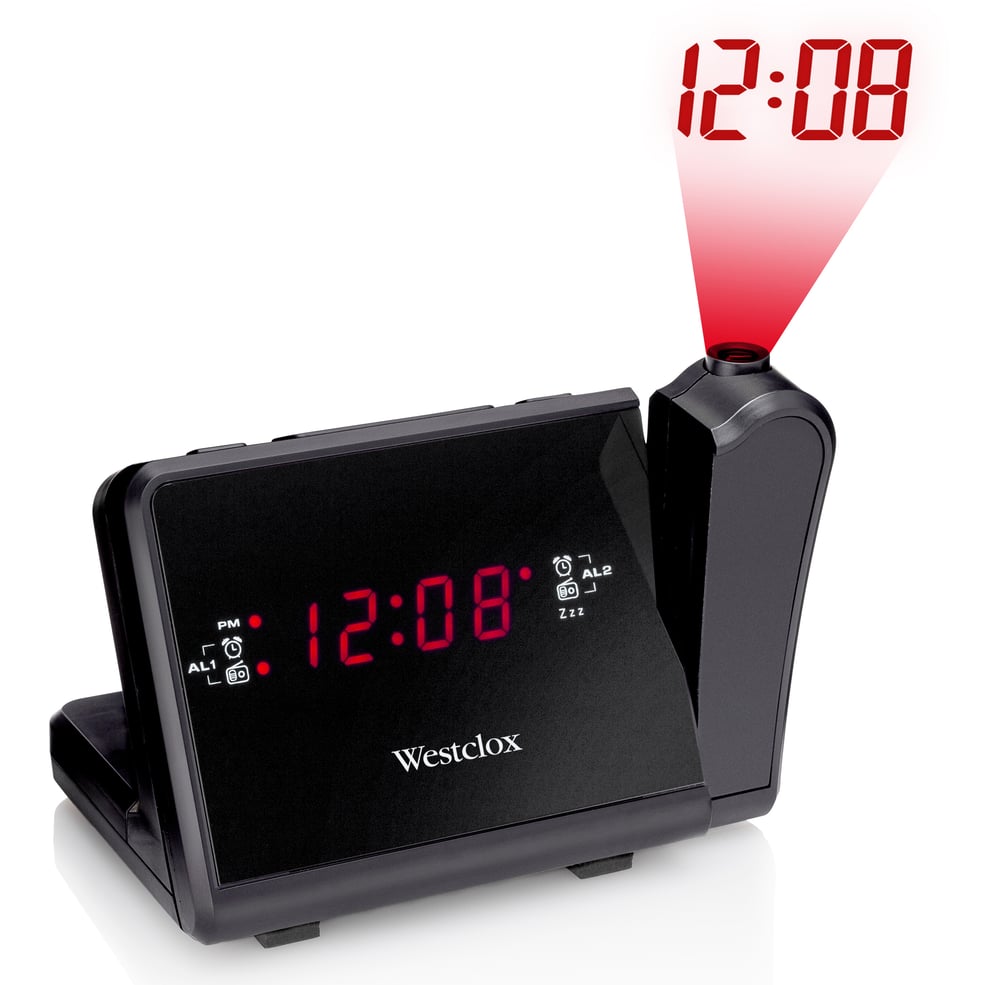
Radio-réveil AM / FM avec projecteur Westclox
Malheureusement, cet article ne fait plus partie de l’assortiment du magasin que vous avez sélectionné et les magasins de la région.
Ces produits similaires présentés ci-dessous pourraient vous intéresser.À l'attention des personnes résidant au Québec: pour obtenir des renseignements sur l'entretien et la réparation, cliquez ici.

Radio-réveil AM / FM avec projecteur Westclox
Produit Détails
Radio-réveil AM / FM avec projecteur Westclox pouvant projeter l'heure sur les murs ou sur le plafond
Réveillez-vous au son de la radio FM ou de l’alarme
Fonctions d’alarme double et de rappel d'alarme incluses
Pile de secours offerte en cas de panne d'électricité
- Si cet article est défectueux, il est couvert par la garantie du fabricant. Dans le cas où aucune garantie n'est indiquée, cet article est couvert par une garantie de un an honorée dans tout magasin Canadian Tire.
- Le ramassage est gratuit dans la plupart des magasins (certains magasins exigent un montant minimum de commande avant taxes).
- Les tarifs d’expédition dépendent de la taille et du poids des articles, ainsi que de la distance entre l’adresse de livraison et le magasin.
- La livraison le jour même coûte 9,99 $ par commande.
- Informations sur une commande en ligne
- La plupart des articles peuvent être retournés ou échangés dans tous les magasins Canadian Tire dans les 90 jours suivant l’achat.
- Certains articles ne sont pas remboursables ni échangeables.
- La politique de retour décrite ci-dessus peut ne pas s’appliquer à l’article que vous consultez présentement. Pour obtenir tous les détails et connaître les critères d’admissibilité, veuillez consulter notre Politique de retour pour connaître les exceptions.
Acheter des produits connexes
- Offres hebdomadaires
- Les clients ont aussi consulté
- Vers les produits tendances
- Plus de cette marque

