




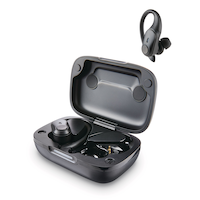
Bluehive Bluepods Sport True Wireless Earbuds, Black
- FREEAvailable
- Available
- Unavailable
Pick up available 08:00 a.m., Feb 21


Only 5 left
Quebec residents: For information on maintenance and repair click here.
Similar Items



Product Details
The Bluehive Bluepods Sport True Wireless Earbuds deliver outstanding performance and comfort for active users. Designed to enhance your listening experience, these earbuds are perfect for people who enjoy music during workouts or need reliable audio on the go. Their ergonomic design ensures comfort during extended use, making them an essential accessory for any gym lover or busy professional.
Secure ear hooks for a stable fit that enhances comfort during intense workouts
Bluetooth® 5.1
50 mAh battery capacity per earbud for uninterrupted listening
350 mAh charging case for convenient recharging on the go
Play Time: 8 Hours
Total play up to 32 hours
Bluetooth® Range: 20-50m (Open Area)
Lightweight, comfortable design for reduced ear fatigue during prolonged wear
Sweatproof with touch control
Automatic power on and instant pairing
Rich acoustics and stereo voice quality for an immersive listening experience
32' wireless distance
Built-in mic for hands-free calling
| Part Number | CTCE106T101 |
|---|---|
| Headphone Type | Ear Hook |
| Smart System Compatibility | Android, Apple iOS, Bluetooth, IPhone |
| Battery Life (hr) | 8 h |
| Battery Charge Time (hr) | 1 h |
| Colour | Black |
| Advanced Features | Wireless |
| Assembled Length (in) | 4.37 in |
| Assembled Width (in) | 2.50 in |
| Assembled Height (in) | 7.19 in |
| Effective Wireless Range (ft.) | 32.00 ft |
|---|---|
| Power Source | Battery |
| Battery Type/Battery Size | Integrated Rechargeable |
| Cord Length (ft.) | 2.30 ft |
| Cushion Material | Silicon |
| Accessories List | Carrying Case, Charging Case, USB Charging Cable |
| Number of Pieces | 3 |
| Wattage | 3 W |
| Minimum Frequency Range (MHz) | 20.00 MHz |
| Maximum Frequency Range (MHz) | 20000.00 MHz |
- This product carries a 1 year exchange warranty redeemable at any Canadian Tire store.
- Pick Up is free at most stores (some stores require a minimum order value before tax)
- Shipping fee is based on size and weight of products and distance from address to store
- Same-Day Delivery costs $9.99 per order
- Online Ordering Information
- Most products can be returned or exchanged at any Canadian Tire store within 90 days of purchase
- Some products are non-refundable and non-exchangeable
- The return policy outlined above may not apply to the product you are currently viewing. For complete details and eligibility, please refer to our Return Policy for exceptions.
Shop Related Products
- Weekly Deals
- Customers Also Viewed
- Top Trending Products
- More From This Brand
Frequently Bought Together


$78.9$180.96
Review Highlights
Reviews
Customer Images and Videos
Filter Reviews
- purchase
- price
- satisfaction
- comfort
- for ears
- quality
- charging
- for playing music
Ear Pods
Over the Ear Buds ...
Great product
Airbeds the Best
Issues connecting to phone.
Questions
Q: Phones are connected, beeps and promps are audible but no music
3 months agoA: 1. Audio Output is Muted or Set Too Low This is the simplest and most frequent cause. The earbuds' volume control is often separate from your phone's media volume. Cause: Your phone's media volume is muted or turned down, even if the general ringtone/notification volume is up. Resolution (iPhone/iOS): While the music or video is playing, press the Volume Up button on the side of your phone. Resolution (Android): Press the Volume Up button. You may also need to open the volume slider menu (usually a gear icon or arrow next to the main volume bar) and ensure the Media Volume slider is high. 2. Incorrect Audio Routing/Output Source Your phone may be paired to multiple devices (like a smartwatch or a speaker) and is routing the audio to the wrong one. Cause (iPhone/iOS): The iPhone might be routing audio to the phone speaker or a different connected device (like an Apple Watch). Resolution: During music playback, tap the AirPlay/Output icon (a triangle with three circles) in the music app or Control Center. Manually select the name of your earbuds from the list of available devices. Cause (Android): The Bluetooth device profile may be configured incorrectly. Resolution: Go to Settings Connected Devices Bluetooth. Tap the Gear Icon next to your earbuds' name. Ensure the toggle for "Media Audio" (or similar wording like "Audio for calls and media") is ON. 3. Audio App is the Problem The specific app you're using (e.g., Spotify, YouTube, a podcast player) may have muted or paused its own player. Cause: The app's internal player is muted, or the song/video has reached its end. Resolution: Force-quit the app and relaunch it. Start a new audio track or video to see if the signal is successfully sent to the earbuds. 4. Firmware or Persistent Software Glitch A temporary software bug on either the phone or the earbuds can cause routing issues. Cause: A minor glitch in the phone's Bluetooth stack or the earbuds' internal firmware. Resolution: Option 1: Restart the Earbuds and Phone. Turn the earbuds off and back on (or place them in the case and remove them). Then, restart your phone completely. Option 2: Forget and Re-pair. Go to your phone's Bluetooth settings, select your earbuds, and choose "Forget This Device" (or "Unpair"). Then, re-pair the earbuds from scratch.
3 months agoHelpful?
Q: Manual for an 035-8089-0 bluehive bluepods sport true wireless earbuds
9 months agoA: Please consult the manual available online.
8 months agoHelpful?
Q: I have no clue what to do with these earbuds. No instructions included in the box & I can't find any manuals online either. Can anyone help?
2 years agoA: I found this https://www.manualslib.com/manual/1811215/Bluehive-035-7309-4.html?page=5#manual
2 years agoHelpful?


