This paragraph should be hidden.




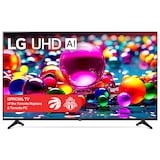
LG UA7000 Series 55-in 4K UHD 60Hz Smart TV with AI Processor
- FREEAvailable
- Available
- Unavailable
Pick up available 09:00 a.m., Jul 19


Only 2 left

Quebec residents: For information on maintenance and repair click here.

Similar Products


Product Details
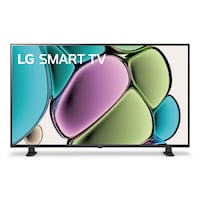
Experience stunning 4K visuals and seamless entertainment with the LG UA7000 Series 4K UHD Smart TV. This 4K TV offers exceptional picture quality and advanced AI technology for superior 4K upscaling and immersive sound. With built-in voice control and compatibility with Alexa and Google Assistant, navigating your favourite streaming content has never been easier.
Bring home 4K resolution in an impressive range of screen sizes with LG UHD TVs
Enjoy swift, easy browsing and tons of personalized recommendations including over 100 free LG channels* *Internet connection required; number of LG Channels subject to change.
4K 60HZ UHD TV
Alpha 7 AI Processor Gen8
WebOS 25
LG Channels
Alexa and Google Compatible
Packed with essentials like 4K, HDR10, ALLM, VRR, and HGIG—catering to families, gift buyers, and casual gamers alike without overwhelming them
With webOS 25, LG Channels, and built-in voice assistant support, it offers a reliable, future-ready smart experience
| Part Number | 55UA7000PUB.ACC |
|---|---|
| Accessories List | Remote Control, Stand |
| Accessories List | Remote Control, Stand |
| Advanced Features | Smart TV |
| Advanced Features | Smart TV |
| Assembled Height (cm) | 76.20 cm |
| Assembled Height (cm) | 76.20 cm |
| Assembled Height (ft) | 2.50 ft |
| Assembled Height (ft) | 2.50 ft |
| Assembled Height (in) | 30.00 in |
| Assembled Height (in) | 30.00 in |
|---|---|
| Assembled Length (cm) | 122.68 cm |
| Assembled Length (cm) | 122.68 cm |
| Assembled Length (ft) | 4.02 ft |
| Assembled Length (ft) | 4.02 ft |
| Assembled Length (in) | 48.30 in |
| Assembled Length (in) | 48.30 in |
| Assembled Weight (kg) | 10.48 kg |
| Assembled Weight (kg) | 10.48 kg |
| Assembled Weight (lb) | 23.10 lb |
| Assembled Weight (lb) | 23.10 lb |
| Assembled Width (cm) | 25.65 cm |
| Assembled Width (cm) | 25.65 cm |
| Assembled Width (in) | 10.10 in |
| Assembled Width (in) | 10.10 in |
| Assembled Width (mm) | 256.54 mm |
| Assembled Width (mm) | 256.54 mm |
| Certifications | No Certifications |
| Certifications | No Certifications |
| Colour | Black |
| Colour | Black |
| Cord Length (ft) | 6.56 ft |
| Cord Length (ft) | 6.56 ft |
| Cord Length (m) | 2.00 m |
| Cord Length (m) | 2.00 m |
| HDMI Inputs | 3 |
| HDMI Inputs | 3 |
| Interfaces Type | HDMI, USB, Ethernet |
| Interfaces Type | HDMI, USB, Ethernet |
| Non-toxic When Used as Intended | Yes |
| Non-toxic When Used as Intended | Yes |
| Number of Ports | 6 |
| Number of Ports | 6 |
| Number of Speakers | 2 |
| Number of Speakers | 2 |
| Package Depth (cm) | 12.60 cm |
| Package Depth (cm) | 12.60 cm |
| Package Depth (in) | 4.96 in |
| Package Depth (in) | 4.96 in |
| Package Height (cm) | 82.50 cm |
| Package Height (cm) | 82.50 cm |
| Package Height (in) | 32.48 in |
| Package Height (in) | 32.48 in |
| Package Weight (kg) | 68.00 kg |
| Package Weight (kg) | 68.00 kg |
| Package Weight (lb) | 149.91 lb |
| Package Weight (lb) | 149.91 lb |
| Package Width (cm) | 138.00 cm |
| Package Width (cm) | 138.00 cm |
| Package Width (in) | 54.33 in |
| Package Width (in) | 54.33 in |
| Panel Shape | Flat |
| Panel Shape | Flat |
| Refresh Rate (Hz) | 60 Hz |
| Refresh Rate (Hz) | 60 Hz |
| Remote Range (ft) | 32.81 ft |
| Remote Range (ft) | 32.81 ft |
| Remote Range (m) | 10.00 m |
| Remote Range (m) | 10.00 m |
| Resolution | Ultra HD (4k) |
| Resolution | Ultra HD (4k) |
| Response Time (ms) | 6 ms |
| Response Time (ms) | 6 ms |
| Screen Aspect Ratio | 16:9 |
| Screen Aspect Ratio | 16:9 |
| Screen Size (cm) | 139.70 cm |
| Screen Size (cm) | 139.70 cm |
| Screen Size (in) | 55.00 in |
| Screen Size (in) | 55.00 in |
| Sustainability | UL Environmental Claim Validation Certified |
| Sustainability | UL Environmental Claim Validation Certified |
| Type of Television | Direct LED |
| Type of Television | Direct LED |
| USB Media Port | 2 |
| USB Media Port | 2 |
| Wattage | 20 W |
| Wattage | 20 W |
| Watts | 20 W |
| Watts | 20 W |
- This product carries a 1 year repair only warranty redeemable at any Canadian Tire store.
- Pick Up is free at most stores (some stores require a minimum order value before tax)
- Shipping fee is based on size and weight of products and distance from address to store
- Same-Day Delivery costs $9.99 per order
- Online Ordering Information
- Most products can be returned or exchanged at any Canadian Tire store within 90 days of purchase
- Some products are non-refundable and non-exchangeable
- The return policy outlined above may not apply to the product you are currently viewing. For complete details and eligibility, please refer to our Return Policy for exceptions.
Compare Similar Products
Only Show Differences | Currently Viewing | |||||
| Ratings | ||||||
| Accessories List | Remote Control, Stand | Remote Control, Stand | Remote Control, Stand | Batteries Included, Remote Control, Stand | Batteries Included, Remote Control, Stand | |
| Advanced Features | Smart TV | Smart TV | Smart TV | Smart TV | Smart TV | |
| Assembled Height (cm) | 76.20 cm | 69.85 cm | 61.98 cm | 71.09 cm | 45.59 cm |



Shop Related Products
- Weekly Deals
- Customers Also Viewed
- Top Trending Products
- More From This Brand
Frequently Bought Together


$1444.96
Review Highlights
Pros
Cons
Reviews
Filter Reviews
- satisfaction
- purchase
- price
- remote control
- color
- clarity
- setup
- quality
Tv ok hard to navigate with no manual

Originally posted on lg.com/ca
LG Smart TV

Originally posted on lg.com
Good tv
Yes, I recommend this product.

Originally posted on lg.com/uk
Great TV
Originally posted on lg.com/uk
Great 4K Picture & Easy Smart TV
Yes, I recommend this product.
Originally posted on lg.com/uk
Questions
Q: What is the width edge to edge (not diagonal) of UAD AI UA 77 4K 65"?
7 months ago- A: Hi there, thanks for reaching out. We understand you want the exact edge‑to‑edge width of the LG 86UA7700PUA (86" Class LG UHD AI UA77 4K Smart TV 2025). The TV measures 75.6 inches wide without the stand. Quick tip: when setting up, ensure your furniture or wall space can accommodate at least 76" of width for proper fit. You can check full specifications here: https://www.lg.com/us/tvs/lg-86ua7700pua-4k-uhd-tv For any further assistance, feel free to DM us at @LGUSSupport. LG Digital Care Team ^Rich7 months ago
Q: How can I connect an external HDD and run my own images on Gallery+? Can I screencast or Chromcast from a computer without a physical connection?
a month ago- A: Hi Rabbi, we appreciate your question, and we understand you want to use your own images with Gallery+ and also cast from your computer to your LG 55UA7700AUA. We know how important it is to personalize your screen and enjoy smooth wireless casting. To help you get everything working, here are a few quick steps: Using your own images with an external HDD: ⦁ Format the drive to FAT32 or NTFS ⦁ Plug it into the TV’s USB port ⦁ Open Photos & Videos from the Home Dashboard ⦁ Select your drive and choose the images you want to display Casting from a computer without a physical connection: Your TV supports Google Cast built‑in and Apple AirPlay 2, so you can cast wirelessly from most computers. ⦁ Windows/ChromeOS: Use Chrome → Cast → Choose your LG TV ⦁ macOS: Use AirPlay → Select your LG TV For a helpful guide on displaying your PC screen on your LG TV, you can check this LG support article: https://www.lg.com/us/support/help-library/lg-tv-connection-how-to-display-your-pc-screen-on-a-tv--20154634843473 If you need further assistance, feel free to email lgdigitalcare@lg.sprinklrsupport.com. ‑LG Digital Care Team ^Richa month ago
Q: How do I connect my 55 Inch Class LG UHD AI UA77A 4K Smart TV 2025 to a Google Drive and display my photo gallery. Are there other cloud options that do not tie up a phone, computer, or iPad?
a month ago- A: Hi Rabbi, we appreciate your question, and we understand you want your 55UA7700AUA to display photos directly from Google Drive or another cloud option without tying up a phone, computer, or tablet. We know how meaningful it is to have your gallery show up exactly the way you envision. Your TV doesn’t support a direct Google Drive login, but you can still view cloud‑stored photos smoothly. Before using any cloud method, try this quick step to confirm the TV can display your images correctly: • Move a few photos to a USB drive, plug it into the TV’s USB port, and open Photos & Videos from the Home Dashboard If that works, here are the best ways to view cloud photos on your TV: ⦁ Use the Web Browser on the TV to sign in to Google Drive and open your photos full‑screen ⦁ Use Google Cast built‑in to cast photos from Google Drive without plugging anything in ⦁ Transfer photos from Google Drive to a USB drive for a device‑free option For a helpful LG guide on displaying content from a computer or cloud service, here’s a direct link: https://www.lg.com/us/support/help-library/lg-tv-connection-how-to-display-your-pc-screen-on-a-tv--20154634843473 If you need further assistance, feel free to email lgdigitalcare@lg.sprinklrsupport.com. ‑LG Digital Care Team ^Richa month ago
Q: What is the weight?
a month ago- A: Hi there, we understand you’re asking for the weight of the LG 55UA7700PUB 55" 4K UHD TV, and we appreciate you taking the time to check the details—making sure the TV fits your setup smoothly is always a smart move. This model weighs: • 22.7 lbs without the stand • 23.1 lbs with the stand Here’s the LG product page for reference: • https://www.lg.com/us/tvs/lg-55ua7700pub-4k-uhd-tv If you need further assistance, feel free to email lgdigitalcare@lg.sprinklrsupport.com. ‑LG Digital Care Team ^Richa month ago
Q: What size wall bracket do I need to hang 65A7700AUA
a month ago- A: Hi there, we appreciate you reaching out, and we understand you want to know which wall bracket fits the LG 65A7700AUA (65UA7700PUB). It’s great that you’re checking compatibility before mounting your TV. For this model, the TV uses a 200 x 300 VESA pattern, so you’ll need a wall mount that supports: • VESA 200 × 300 A helpful step before mounting: • Confirm the mount’s VESA support on the box or product page to ensure a proper fit The LG mount that is compatible with your TV is: • LG OLW480B EZ Slim Wall Mount (It supports the 65" UA7700AUA Series) Here’s the mount’s page for guidance: • https://www.lg.com/us/tv-home-theater-accessories/lg-olw480b-wall-mount If you need further assistance, feel free to email lgdigitalcare@lg.sprinklrsupport.com. ‑LG Digital Care Team ^Richa month ago
Q: Is this rated for outdoor use?
2 months ago- A: Hello, JC. We understand your inquiry regarding whether the LG 55 inch Class UA7700 Series LED 4K UHD Smart webOS TV 55UA7700PUB is rated for outdoor use. This specific model is designed and rated for indoor residential use only as it does not have the specialized protection against moisture, dust, or extreme temperature fluctuations required for outdoor environments. One helpful troubleshooting step to protect your TV is to ensure it is placed in a well-ventilated indoor area away from direct sunlight or heat sources to maintain its longevity and picture performance. Please send us an email at lgdigitalcare@lg.sprinklrsupport.com if you need further assistance on your inquiry or if you have further questions. ^James2 months ago
Q: I cannot find where to attach power cord to tv
2 months ago- A: Hello, thanks for reaching out to us. We understand you’re setting up your 50UA7700PUB and want clear guidance on where the power cord connects. The power cord attaches to the recessed AC IN port on the back-left side of the TV when viewing the back panel. A helpful first step: • Place the TV face‑down on a soft surface • Look for the recessed AC IN label • Insert the included power cord firmly until fully seated For visual guidance, here’s the official manual link for your model: • https://www.lg.com/us/support/product/lg-50UA7700PUB.AUS?tab=1 If you need further assistance, feel free to email lgdigitalcare@lg.sprinklrsupport.com. ‑LG Digital Care Team ^Rich2 months ago
Q: I recently bought the 55inch 4K UHD AI SMART TV 55UA7000. What tv mount is compatible with this tv?
2 months ago- A: Hello there, thanks for reaching out to us. We understand you want to know which wall mount is compatible with your 55UA7000 (55UA7700PUB) TV, and it’s great that you’re checking this before installing it. This model uses a 200 x 300 VESA pattern, so any mount that supports that size will work. A helpful first step is to look at the back of your TV and confirm the mounting holes match the 200 mm x 300 mm spacing. For an LG‑recommended option, you can check out our compatible wall mount here: https://www.lg.com/us/tv-home-theater-accessories/lg-olw480b-wall-mount If you need further assistance, feel free to email lgdigitalcare@lg.sprinklrsupport.com. ‑LG Digital Care Team ^Rich2 months ago
Q: Do I need a subscription to display my own pictures in Gallery mode?
4 months ago- A: You do not need a subscription to display your own pictures in Gallery mode on LG TVs that support the feature. The LG 75-inch Class LG UHD AI UA77 4K Smart TV 2025, Model # 75UA7700PUA, does not support Gallery mode. A subscription is not required for basic use of the Gallery mode on LG TVs, as free content is available. While a paid subscription is offered for the upgraded LG Gallery+ service (which offers a wider selection of art and enhanced features), a free, limited version is available on models supporting the feature...^Ivan.4 months ago
Q: can i play my music on the tv
4 months ago- A: Hello JD, we appreciate your question about the 55UA7700AUA, and we understand you want to know if you can play your music on the TV. You can do this by using Bluetooth, casting from your phone, or opening any music app available in the TV’s webOS app store. As a quick check, make sure Bluetooth is turned on in the TV settings or that your phone and TV are on the same Wi‑Fi network for casting. You can review the full TV details here: https://www.lg.com/us/tvs/lg-55ua7700aua-4k-uhd-tv If you need further assistance, feel free to email lgdigitalcare@lg.sprinklrsupport.com. ‑LG Digital Care Team ^Rich4 months ago