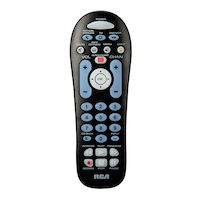
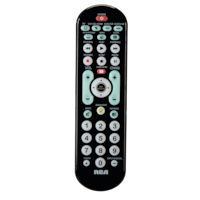
RCA CRCRBB04GR 4-Device Big Button Universal Remote Control, Black
- FREEAvailable
- Available
- Available
Pick up available 09:00 a.m., Dec 19


Only 1 left
Quebec residents: For information on maintenance and repair click here.

Similar Items

Product Details
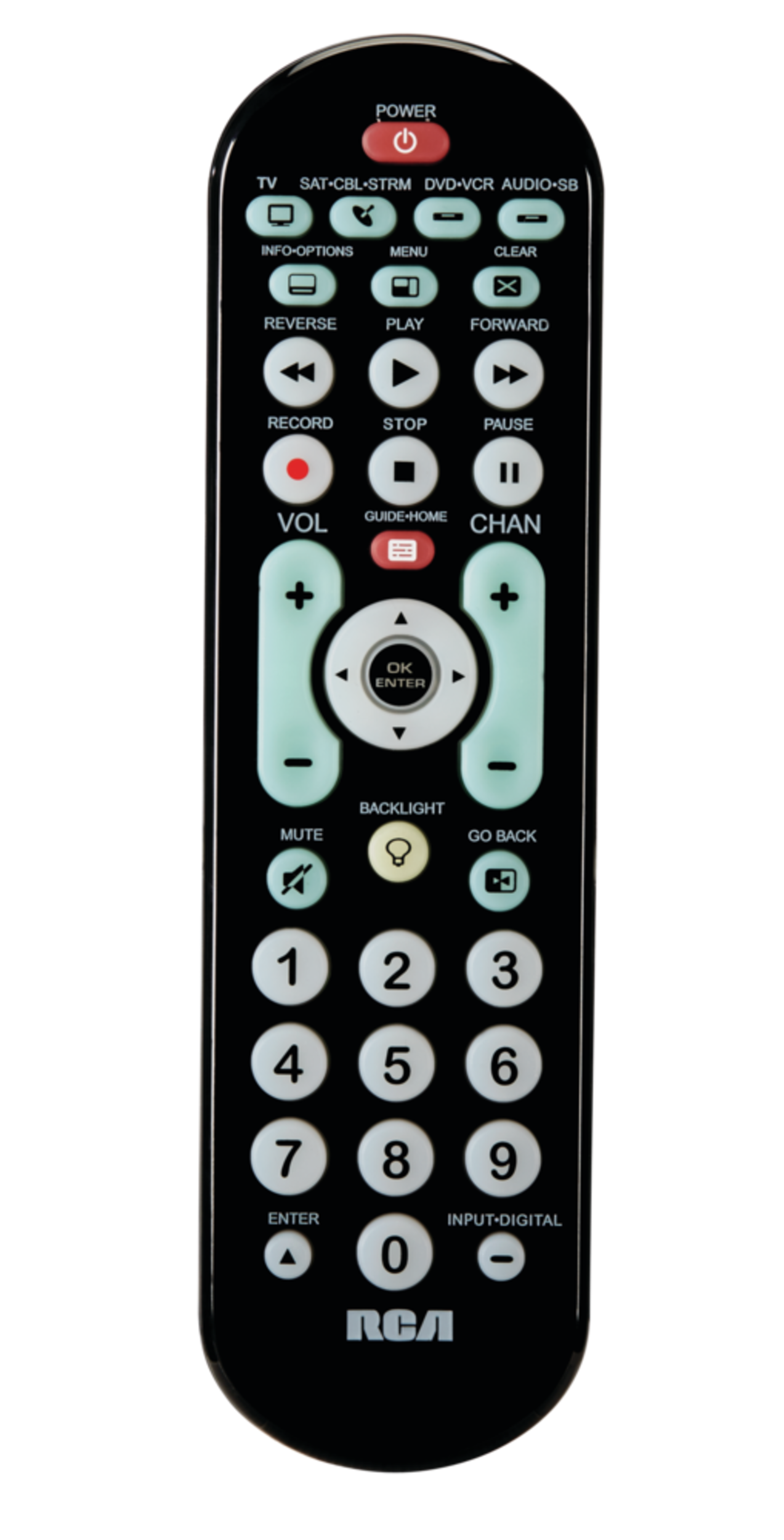
Easily control all your entertainment devices with the reliable RCA CRCRBB04GR 4-Device Big Button Universal Remote Control. Its oversized buttons and dual navigation system make it incredibly easy to use. With convenient green backlighting, the remote is accessible even in low light. The remote supports menu and guide functions, plus volume key punch-through for added convenience whenever you need it.
Controls your TV, satellite/cable/streaming, DVR, DVD player and audio/sound bar with ease
Requires two AAA batteries (batteries not included)
Limited Lifetime Warranty
Model#: CRCRBB04GR
Includes streaming player codes
Simplifies device setup with automatic, brand, manual and direct code search methods
Supports all major brands
Ergonomic, thin design
| Part Number | CRCRBB04GBE |
|---|---|
| Advanced Features | Programmable |
| Battery Technology | Alkaline |
| Battery Type/Battery Size | AA |
| Certifications | CSA |
| Colour | Black |
| Consumer Pack Size | 1 |
| Electronics | Televisions, Stereos |
| Package Depth (cm) | 4.00 cm |
| Package Depth (in) | 1.57 in |
| Package Height (cm) | 28.00 cm |
|---|---|
| Package Height (in) | 11.02 in |
| Package Weight (kg) | 0.14 kg |
| Package Weight (lb) | 0.31 lb |
| Package Width (cm) | 4.50 cm |
| Package Width (in) | 1.77 in |
| Power Source | Battery Operated |
| Product Use(s) | Television Remote |
| Remote Control Range (ft) | 0.00 ft |
| Remote Control Range (m) | 0.00 m |
| Remote Control Transmitter Frequency (Mhz) | 0.00 MHz |
| Remote Technology | Infrared |
| Smart System Compatibility | No Smart Technology |
| Transmitter Style | Handheld |
- This product carries a 1 year exchange warranty redeemable at any Canadian Tire store.
- Pick Up is free at most stores (some stores require a minimum order value before tax)
- Shipping fee is based on size and weight of products and distance from address to store
- Same-Day Delivery costs $9.99 per order
- Online Ordering Information
- Most products can be returned or exchanged at any Canadian Tire store within 90 days of purchase
- Some products are non-refundable and non-exchangeable
- The return policy outlined above may not apply to the product you are currently viewing. For complete details and eligibility, please refer to our Return Policy for exceptions.
Shop Related Products
- Weekly Deals
- Customers Also Viewed
- Top Trending Products
- More From This Brand
Weekly Deals






Frequently Bought Together

$38.98
Review Highlights
Pros
Cons
Reviews
Filter Reviews
- ease of use
- setup
- instructions
- purchase
- size
- price
- buttons
- satisfaction
Cheap product
Great Buy
Not for Me!
No, I do not recommend this product.
That said, the remote does support multiple programming methods—automatic search, brand search, manual entry, and direct codes.
Bon
User friendly
Questions
Q: will this remote operate my tv and the dvd player as well
2 years agoA: Oui
a year agoHelpful?
Q: I have 3 compatibility questions, for older electronics> Will this remote work with (1) Panasonic Plasma TV TH 24PHD5, (2) DVD Player, 2006, GPX model D1816 SIL) and (3) DVD player, NORCENT.
2 years agoA: Hello, The Panasonic codes are preprogrammed into the remote control. The GPX and Norcent DVD player codes are not pre-programed into the remote, but you can still find the correct code by using the Auto Code Search function on the remote. Auto Code Search goes automatically through all the codes for the device you’re trying to control and identifies the correct one. It is straight forward and the directions are included with the remote.
2 years agoHelpful?
Q: Will this work on an rca roko smart tv
3 years agoA: It Should..... But you download the instruction manual for it first and read completely (I know WE never do that) it should explain how to use it with Roku. {Roku is just another operating system like windows or Android or uck Apple} , ( All these manuals can be found on the RCA web site just note the model that you search the model by images on google or goto the store & take a picture). I should explain I DON'T LIKE OR USE ROKU. It's what you have chosen . But it's TOO PROPRIETARY for me. [As of July 11 2022 ALL STREAMING is still freei n Canada So Why not KODI On Android or android box instead IT"S LEGAL HERE.
3 years agoHelpful?
Q: comment programmer une commande crcrbbo4gr avec une TV Samsung code 12051
4 years ago- Translate with Google
A: Entrée directe de code La saisie directe des codes vous permet d'entrer un code provenant de la liste de codes qui accompagne votre marque d'appareil. Ce n'est pas aussi facile que les autres méthodes, mais c'est potentiellement la méthode la plus rapide. 1. Allumez manuellement l'appareil que vous voulez contrôler. 2. Trouvez la liste de codes fournie avec la télécommande. Localisez la section correspondant au type d'appareil que vous essayez de programmer et trouvez votre marque dans cette section. Encerclez les codes correspondant à votre marque et gardez-les à portée de main. Vous avez déjà identifié le code 12051 3. Appuyez sur la touche de l'appareil que vous voulez programmer et maintenez-la enfoncée (la touche POWER s'allume). Tout en maintenant la touche de l'appareil enfoncée, entrez avec l'autre main le premier code à cinq chiffres de votre marque dans la liste des codes (la touche POWER s'éteint après le premier chiffre). CONSEIL : Chaque touche de périphérique est associée à un type d'appareil. d'appareil - la touche TV est préréglée pour rechercher les téléviseurs, SAT-CBL-STRM pour les récepteurs satellite, les boîtiers de câble, les convertisseurs de télévision numérique ou les médias en continu. ou les convertisseurs de télévision numérique ou les lecteurs de médias en continu, DVD-VCR pour les lecteurs de DVD et DVR-AUX pour les enregistreurs numériques. Pour programmer une touche de périphérique pour un autre type de périphérique, consultez la section Modification du type de périphérique d'une touche. 4. Lorsque vous avez terminé de saisir le code à cinq chiffres, maintenez enfoncée la touche touche de périphérique et regardez la touche touche POWER. La touche POWER est-elle allumée ? Si OUI : vous avez terminé ! Vous avez programmé cette clé électronique. Si NON, elle a clignoté quatre fois et s'est éteinte : Vous avez soit saisi un numéro de code qui ne figure pas dans les listes de codes, soit manqué une étape de la procédure de saisie du code. Essayez à nouveau l'étape 3. NOTES N'oubliez pas d'entrer le code pour référence ultérieure dans la case prévue à cet effet dans la section Récupération de code de ce manuel. Si votre marque ne figure pas dans la liste des codes, utilisez l'une des méthodes de recherche de code pour programmer la télécommande. (Reportez-vous aux méthodes de recherche de code automatique et manuelle). Si vous relâchez la touche de l'appareil à tout moment pendant la procédure de saisie directe des codes, la touche POWER clignote quatre fois et le processus est abandonné. Le dernier code programmé sous la touche de l'appareil est conservé. Testez la télécommande avec l'appareil pour vous assurer que la clé de l'appareil est programmée avec le bon code pour une fonctionnalité maximale. Si certaines fonctions ne fonctionnent pas, essayez un autre code de la liste.
4 years agoHelpful?
Q: Will this work for an rca smartvirtuoso tv?
5 years agoA: Good morning. Yes, this remote can be set up to operate the TV.
5 years agoHelpful?
Q: Hi. Will this work for an older Jensen tv? It is approximately from 2011. I am having a hard time getting a universal remote to work. RCA is supposed to but so far the ones I've tried don't.
5 years agoA: The Jensen code isn’t programmed on the remote but there is a function called “auto-code search” to try to find the proper code that will work the TV. How to use this function will be in the instruction book. That is the best solution.
5 years agoHelpful?
Q: How can I use the GUIDE-HOME button with the Channel Lock feature?
5 years agoA: Unfortunately, GUIDE-HOME is not one of the keys that is locked when the “channel lock” feature is activated so you would have to select the “device” key of the unit you are trying to access the menu feature with to have the menu key be active for it. Hope this helps
5 years agoHelpful?
Q: How can I make it so the remote doesn't automatically turn off a Cable box when pressing the SAT-CBL-STRM button?
5 years agoA: Try using one of the other codes listed for your device. Hope this addresses your problem.
5 years agoHelpful?
Q: Would this remote be programmable for analog set up?Thanks
5 years agoA: Hi. I think I might need more information to give an accurate response. The RCA remote can be programmed to operate TV, VCR, DVD, Sound bars, streaming devices etc from most brands. All devices though must be capable of receiving an Infra-Red (IR) signal from the remote. If the device you want to operate does not have IR capability the remote won't work. A rotary dial analogue TV for example generally did not have an IR receiver. The remote would be unable to communicate with the TV. If you could give me more information about the device you want to operate with the remote such as brand, model number typer of unit..., I might be able to provide additional information. Hope this is of help
5 years agoHelpful?
Q: How about sanyo smart TV?
6 years agoA: Yes it would work.
6 years agoHelpful?